Stay Fresh with the Best Laptop Cleaning Kit
- AnHome Store
- Apr 13, 2024
- 2 min read

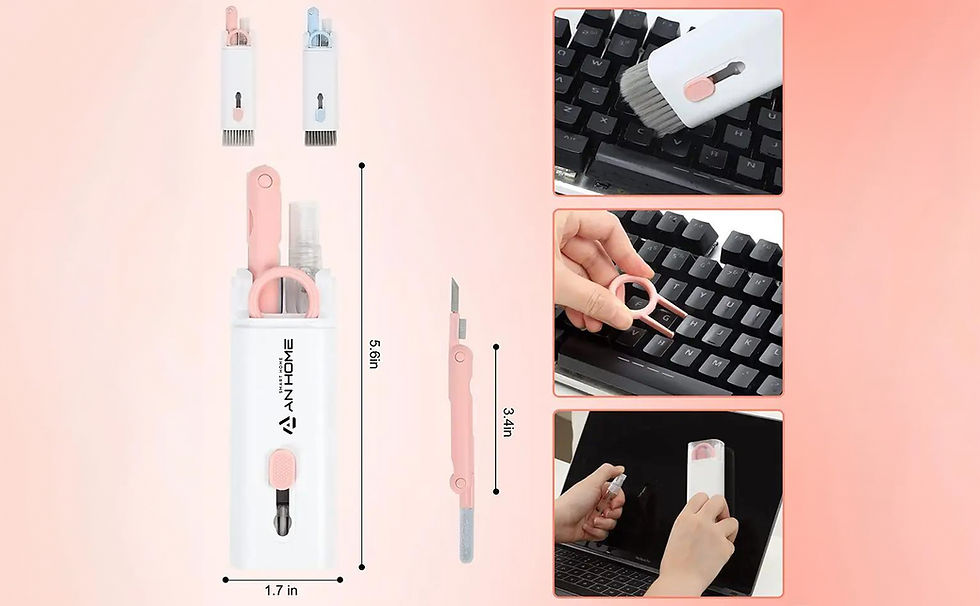
In the digital age, laptops have become our constant companions, whether for work, study, or entertainment. However, frequent use can lead to the accumulation of dust, fingerprints, and grime. A laptop cleaning kit is essential for maintaining your device’s hygiene and performance. In this post, we’ll explore how to keep your laptop in top condition with the best laptop cleaning kit.
Why Clean Your Laptop?
Regular cleaning of your laptop not only maintains its appearance but also extends its lifespan. Dust and debris can clog vents and overheat components, while sticky keys and smudged screens can hinder productivity. A laptop cleaning kit ensures that your device remains fresh, efficient, and ready for action.
Choosing the Right Laptop Cleaning Kit
When selecting a laptop cleaning kit, consider the following:
Quality of Materials
A good laptop cleaning kit should include microfiber cloths, which are gentle on screens and surfaces. Avoid abrasive materials that can scratch or damage your laptop.
Variety of Tools
Look for kits that offer a range of tools, such as brushes for keyboard crevices and solutions for screen cleaning. The more versatile the kit, the better it can address different areas of your laptop.
Safe Cleaning Solutions
Ensure that the cleaning solution in your laptop cleaning kit is alcohol-free and formulated specifically for electronics. This will prevent damage to sensitive components.
How to Use Your Laptop Cleaning Kit
Using your laptop cleaning kit effectively involves a few simple steps:
Power Down: Always turn off your laptop before cleaning.
Dust Off: Use the brush or compressed air to remove debris from the keyboard and ports.
Wipe Clean: Gently clean the screen and body with a microfiber cloth and a few drops of the cleaning solution.
Dry Off: Use a dry cloth to remove any excess moisture.
Maintaining Your Laptop’s Cleanliness
To keep your laptop fresh between deep cleans, practice these habits:
Regular Dusting: Use a soft brush or cloth to dust off the keyboard and screen regularly.
Avoid Eating: Keep food away from your laptop to prevent crumbs and spills.
Protective Case: Use a case or cover to shield your laptop from dust when not in use.
Conclusion
A laptop cleaning kit is a small investment that can make a big difference in the performance and longevity of your laptop. By choosing the right kit and using it regularly, you can ensure that your laptop stays as fresh and efficient as the day you bought it.


Comments