Choosing the Right USB to HDMI Adapter for Your Needs
- AnHome Store
- Apr 19, 2024
- 2 min read

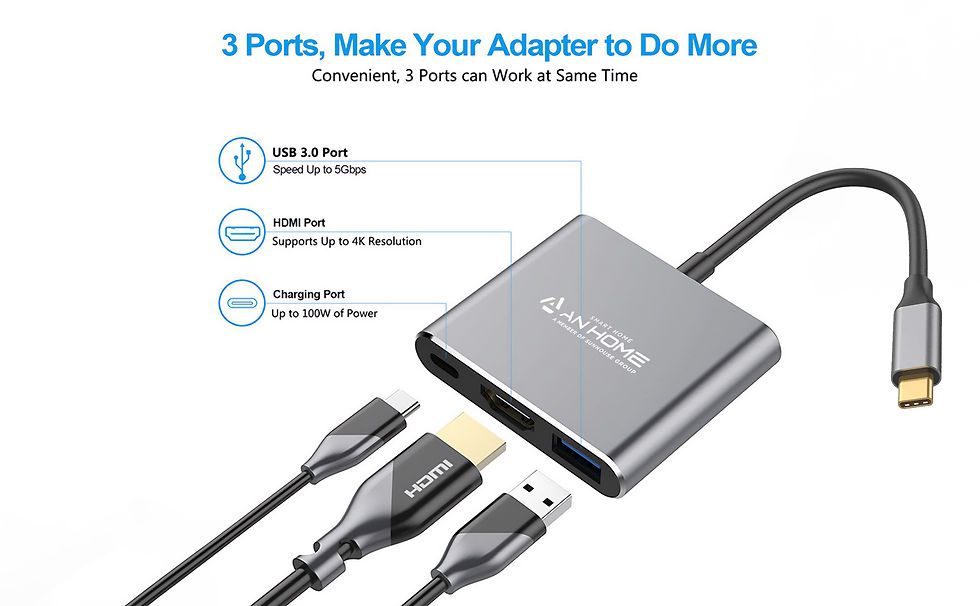
When it comes to connecting devices, the USB to HDMI adapter is a versatile tool that bridges the gap between your USB-capable device and an HDMI display. Whether you’re presenting in a boardroom, setting up a workstation, or streaming media to a larger screen, selecting the right adapter is crucial for a seamless experience. In this guide, we’ll explore the key considerations to ensure you pick the perfect USB to HDMI adapter for your needs.
Understanding Compatibility
Before diving into the sea of adapters available, it’s essential to understand the compatibility of your devices. Check your computer’s USB port type – is it a standard USB-A, a USB-C, or perhaps a Thunderbolt 3? Similarly, identify the HDMI input on your display, be it a monitor, TV, or projector. Ensuring that the USB to HDMI adapter matches your hardware specifications is the first step towards a compatible connection.
Resolution and Performance
The quality of the output is paramount. Look for an adapter that supports your desired resolution. Full HD (1080p) is a common benchmark, but 4K adapters are increasingly popular for ultra-high-definition displays. Additionally, consider the adapter’s refresh rate capabilities, especially if you’re into gaming or high-definition video editing. A higher refresh rate means smoother visuals, making a significant difference in performance.
Build Quality and Durability
You want an adapter that can withstand the rigors of daily use. A well-built USB to HDMI adapter with a robust casing and reinforced cable strain relief will serve you well in the long run. It’s worth investing in a quality adapter from a reputable brand to avoid signal degradation or physical damage over time.
Portability and Ease of Use
If you’re always on the move, a compact and lightweight adapter is ideal. Some adapters come with a plug-and-play feature, requiring no additional drivers or software installations, which is a boon for those who need a quick and easy setup.
Additional Features
Some USB to HDMI adapters come with extra features like multiple HDMI ports, allowing you to connect to several displays simultaneously. Others include additional USB ports, enabling you to charge devices or connect peripherals like keyboards and mice. Consider these added functionalities if they align with your requirements.
Conclusion
Choosing the right USB to HDMI adapter involves considering compatibility, resolution, build quality, portability, and additional features. By keeping these factors in mind, you can ensure a reliable and high-quality connection that meets your digital needs.


Comments